
Building on April’s analytics dashboard and Spark launch, May is all about empowering educators. We’re shipping full classroom and lesson management for teachers, deeper analytics views with session-level replay, and an expanded Career Pathway experience in Spark. Here’s everything new.
The New Analytics Dashboard
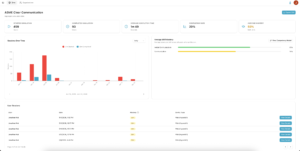
The updated dashboard, with aggregate session data, completion rates, and average skill mastery across all learners
The HyperSkill analytics dashboard got two meaningful upgrades this month.
Improved Visuals and Aggregate Data: The main dashboard now displays a richer picture of simulation performance — sessions started vs. completed over time, average completion time, completion rate, and average skill mastery broken out by competency. Everything you need to assess how a simulation is landing across your learner population, at a glance.
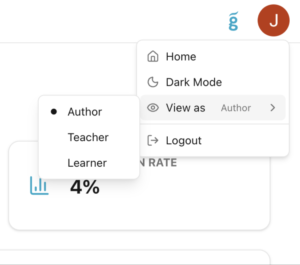
Dashboard Views: Authors, teachers, and learners each see a different HyperSkill — and now you can switch between them. A new “View as” menu in the top-right corner lets you toggle between Author, Teacher, and Learner perspectives without logging in and out of separate accounts. Useful for QA, onboarding, and support.
Classroom and Lesson Management
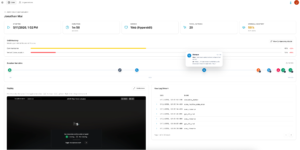
This is the biggest release of the month. HyperSkill now gives teachers a full classroom management experience, built directly into the web portal.
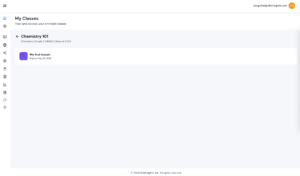
Create Classes and Invite Students: Teachers can now create classes, tag them by subject, grade level, standards, and graduation year, and invite students by email. Students receive access and see their enrolled classes immediately in their own learner view.
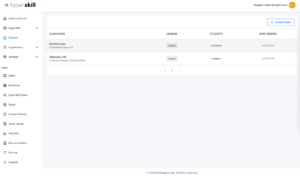
The new Classes page — create a class, view lesson counts, student enrollment, and creation dates all in one place.
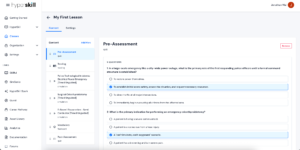
Build Lessons: Inside each class, teachers can build structured lessons that combine multiple content types: pre-assessments, readings, vocabulary, simulations, and post-assessments — all sequenced and organized in a single lesson view. Each content block is tagged by type and can be marked timed or ungraded.
Spark: Career Pathway
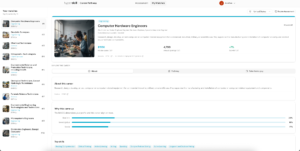
Career Pathway feature gives learners a personalized view of where their skills could take them. Based on activity and interests, the pathway surfaces matched career options with salary data, job opening counts, growth trends, and the top skills associated with each role. Learners can explore the “About,” “Pathway,” and “Take Home Pay” tabs for each career — giving the experience real depth beyond a simple career list.
VR and Platform Improvements
May includes a solid round of bug fixes and quality-of-life improvements across VR, desktop, and web.
VR
- Restrict Player Movement now correctly disables both teleport and locomotion, giving authors reliable control over learner navigation in constrained environments.
- Clear Cache deletes all downloaded simulations, so learners can fully reset their local library when troubleshooting or freeing up device storage.
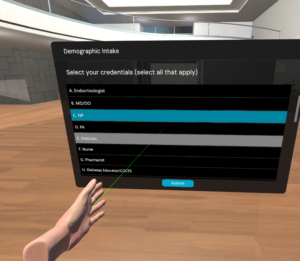
- Quiz interactions can now be selected anywhere on the answer row — not just on the checkbox — making it easier to interact in VR.
- Drone control accuracy is improved.
- Use Trigger now highlights correctly when triggered.
VR and Desktop
- Persistent highlight issues are fixed across both platforms.
- Display Message now supports an optional header, and authors can choose placement at bottom-center or bottom-right — giving more flexibility for how messages appear in simulation.
- VO (Virtual Object) descriptions are improved — object labels now render more cleanly in-scene.
Agents Service: The AI agents backbone has been upgraded from JSON mode to structured output, improving reliability and reducing errors in SimGenie-powered interactions.
- Authors can now use SimGenie to support and update State Actions and Settings directly in the authoring flow.
-
Display Message actions in SimGenie now support header toggling and placement configuration, matching the new VR/Desktop options described above.
Explore the platforms:
Generate your first AI simulation: https://simgenie.siminsights.com/
Browse the Skillful catalog: http://marketplace.siminsights.com/
About HyperSkill
HyperSkill is a no-code 3D simulation platform for both Virtual and Augmented Reality. HyperSkill was created to enable instructional designers to create immersive training content without having to learn programming. HyperSkill includes thousands of 3D assets and simulations that are accessible for free to users.
About SimInsights
SimInsights’ mission is to democratize the creation of 3D, interactive, immersive, and intelligent (I^3) simulations. We believe that simulations are the most impactful way to learn, yet few people can actually leverage them as a creative medium. SimInsights offers HyperSkill, a no-code tool to enable everyone to capture their knowledge in the form of 3D immersive, AI-powered simulations and share it with others.